




Contact Center Migration
Move to BlueTweak without disrupting support operations, with a structured migration path covering data, integrations, and workflows.
Vertrouwd door klantgerichte bedrijven over de hele wereld






Why contact center migrations fail even when the product is right
Support teams cannot pause operations to go through a painful implementation. When migration is unclear or rushed, adoption slows, and teams fall back to old tools.

Inconsistent Workflows
Workflows differ across teams, channels, and regions.
Fragmented Data
Data and history live in multiple tools and formats.
Integration Bottlenecks
Integrations become the hidden bottleneck that delays go-live.
Adoption Challenges
Teams need guidance to drive consistent adoption rather than reverting to old habits.
The BlueTweak approach to contact center migration:
map, migrate, go live
Migration should fit around your operation, not force a rebuild on day one.
Discovery and workflow mapping
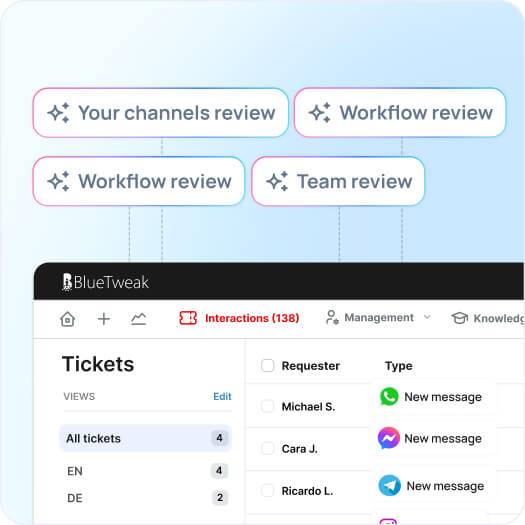
Before anything is configured, BlueTweak reviews your current channels, workflows, teams, and goals. This defines what success looks like for your specific operation rather than applying a generic setup.
Configuration and setup
The platform is structured around your routing rules, roles, brands, and operational workflows. Different teams and business units can be configured differently, so nothing gets forced into a one-size-fits-all setup.

Data and knowledge migration
BlueTweak supports moving information, customer profiles, historical context, and knowledge content, so teams start with continuity rather than from scratch.

Integrations and validation
The systems your team already relies on are connected through BlueTweak's API-first integration framework and validated end-to-end before going live. Integrations are tested across channels so nothing breaks when you switch.

Controlled go live and optimisation
Migration launches with a controlled scope, so risk is managed. Performance is monitored in the early stages, and the setup is iterated based on real usage rather than assumptions.

Why teams choose BlueTweak for contact center migration

Phased rollout
Migration happens in stages that align to your operation, not all at once, so teams adopt gradually without disruption.
Data continuity
Customer profiles, interaction history, and knowledge content move with you so agents start informed rather than starting over.
API-first integration
BlueTweak connects to the systems you already use, so migration does not mean replacing your entire stack.
Configuration per team
Different business units, brands, and regions can be set up differently from the start, rather than forcing a uniform configuration across the whole organisation.
Guided adoption
BlueTweak provides a guided approach to help teams standardise workflows and build consistent habits rather than reverting to old processes.
Start capturing every conversation in BlueTweak
Boek een demo

What support teams say about BlueTweak

“De overstap naar dit klantenserviceplatform verliep voor ons team vlekkeloos. De oplossing voldeed niet alleen aan onze verwachtingen, maar overtrof deze zelfs, wat resulteerde in een naadloos communicatiesysteem via meerdere kanalen dat onze passagiers in realtime op de hoogte hield.”
Veelgestelde vragen
How long does a contact center migration to BlueTweak take?
Most BlueTweak clients are fully operational within four weeks. The timeline depends on the complexity of your current setup, the number of integrations needed, and how much historical data needs to be migrated. BlueTweak follows a phased approach so teams can go live with a controlled scope and expand from there.
Can BlueTweak migrate data from our current platform?
Yes. BlueTweak supports the migration of customer profiles, interaction history, and knowledge content from existing platforms. The goal is to preserve continuity so agents start with the context they need rather than rebuilding from scratch.
What happens to our integrations during contact center migration?
BlueTweak uses an API-first integration framework to connect the systems your team already relies on. Integrations are configured and validated end-to-end before going live, so existing workflows are not broken during the transition.
Can different teams or regions be set up differently in BlueTweak?
Yes. BlueTweak supports configuration at the brand and team level, so different business units, regions, or brands can have different routing rules, workflows, and setups. Contact center migration does not require forcing a uniform configuration across the whole organisation.
How does BlueTweak help teams adopt the new platform after migration?
BlueTweak provides a guided onboarding approach that covers workflow configuration, training, and standardisation. The goal is to help teams build consistent habits from the start rather than reverting to processes from their previous platform.
Is it possible to migrate from Zendesk or Freshdesk to BlueTweak?
Yes. BlueTweak's contact center migration approach is designed to handle data, workflows, and integrations from established platforms, including Zendesk and Freshdesk. The discovery phase maps your current setup so nothing important is missed during the transition.
What if our support operation cannot afford downtime during migration?
BlueTweak's phased rollout approach is specifically designed for teams that cannot pause operations. Migration starts with a controlled scope, runs alongside your existing setup where needed, and expands gradually so support continuity is maintained throughout.
Let us map your contact center migration